To meet the Principal Performance Obligations under the Electricity Industry Participation Code (the Code), the System Operator regularly assesses current and projected system needs. These assessments could result in us reviewing the Ancillary Services Procurement Plan and proposing changes to the amount and nature of each ancillary service. Such changes involve consultation(s) where the industry can provide feedback. If the Electricity Authority approves of the proposed changes, they are implemented into the Procurement Plan; future contracts are then updated to ensure alignment.
We organise each tender round to meet the forecast system security needs, and this preparatory work ensures that the tender is targeted accurately. To help potential providers understand how to participate in this process, we have outlined the key steps involved below.
Which services are we procuring?
We procure ancillary services on a fixed two-yearly schedule, alternating the services we procure in our annual tender process, as follows:
Even years (2026, 2028 etc.)
- Multiple frequency keeping* (MFK)
- Single frequency keeping (SFK)
- Instantaneous reserve* (IR)
- Black start (BS) for the North Island
Odd years (2027, 2029 etc.)
- Over-frequency reserve (OFR)
- Black start (BS) for the South Island
* Note: Those looking to offer MFK or IR may seek to enter an ancillary service contract outside of the fixed tender schedule, once their integration into the power system is complete and they have demonstrated the capability to provide the service to the satisfaction of the System Operator.
Currently Contracted Providers
The currently contracted providers of ancillary services can be found here.
The Provider Journey
Once you have become familiar with the ancillary services we procure, you need to engage with the System Operator if you want to offer such a service to the electricity market. We have prepared the information below to call out the high-level activities involved over four phases: preparation, integration, contracting, and provision.
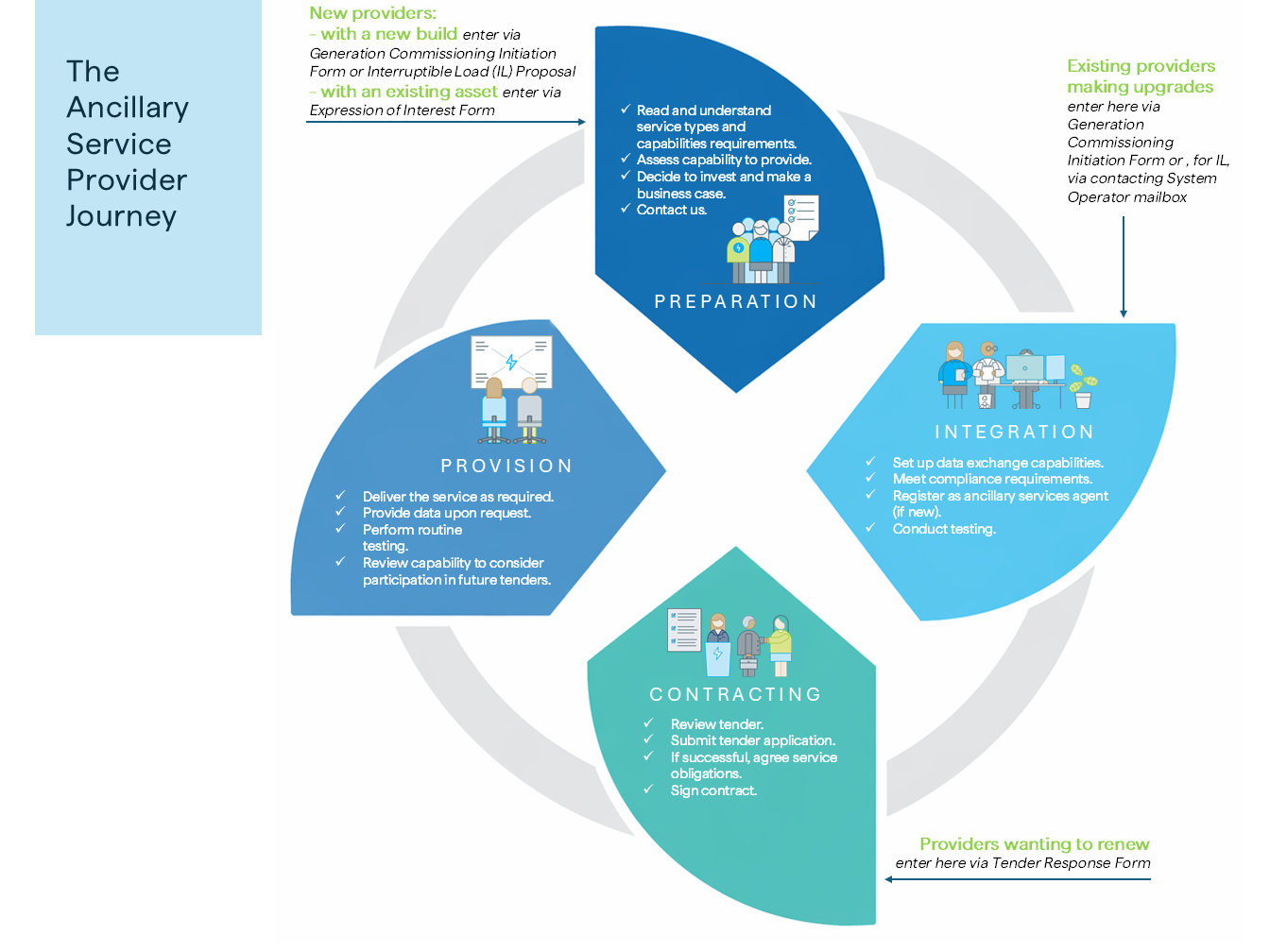
Select the appropriate options from the dropdown menus to view the relevant journey details, if an invalid selection is made no additional information is displayed.